Helping 16.9K sellers find resources they could trust, fast.
Rebuilding Resources, the library where Salesforce sellers find demos and sales materials, from scratch and in the middle of a reorg.
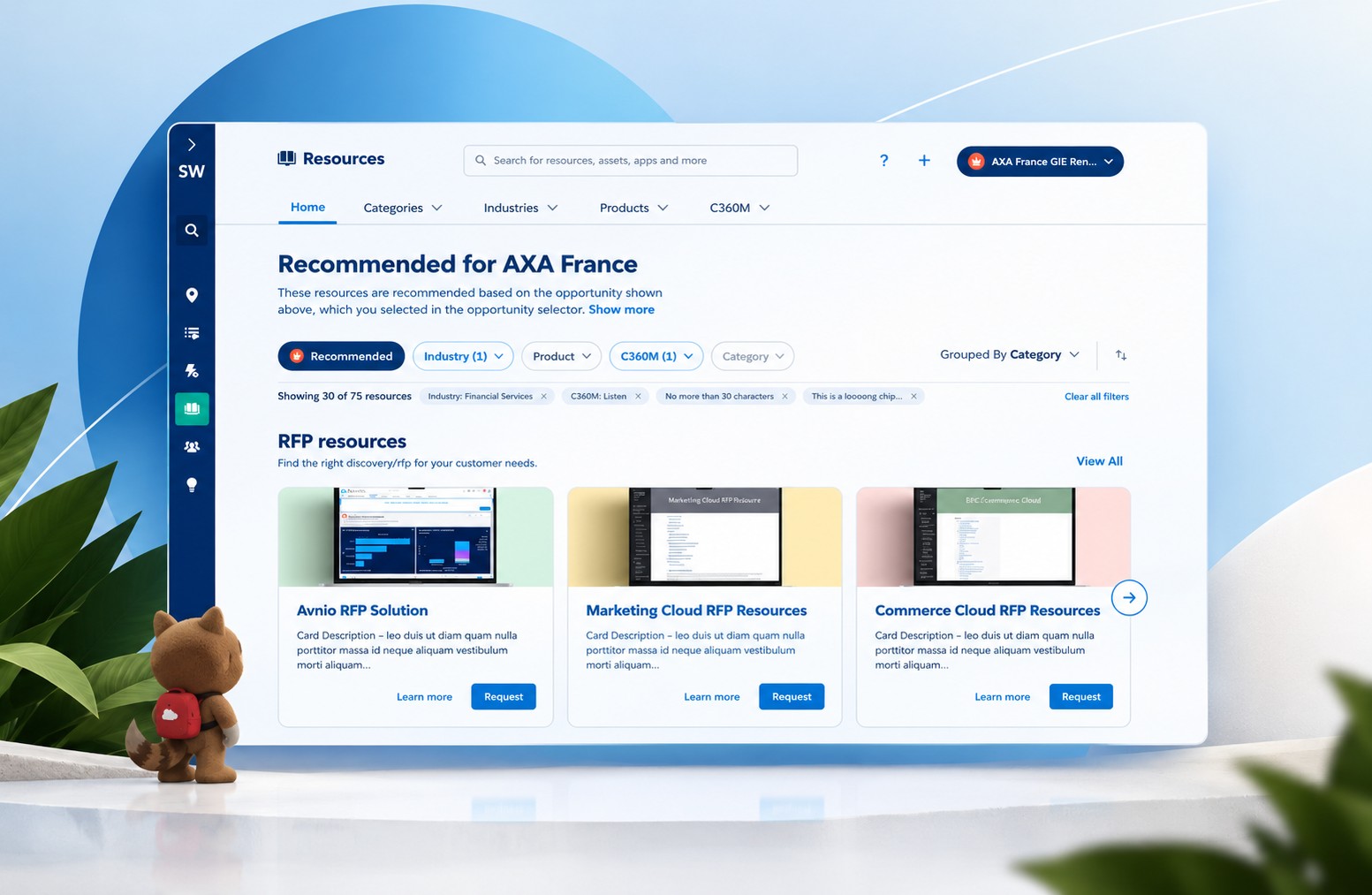
A library everyone needed and nobody trusted.
Every content type looked the same, metadata was inconsistent, and the good material was scattered across an older site, Solutions Central.


Drag to compare the legacy Solutions Central page with the shipped Resources home.
Task: "I need a photo of a customer service agent who matches my customer's persona, for a demo tomorrow."
From our journey map for the Persona Library resource. Same task, same content, fewer places to go.
Sellers, plus the people who publish for them
16.9K users. Sellers arrive with a deal and a short clock; content owners have to keep the library accurate.
"I don't know where to start or what's available."Top pain point for account executives, from the platform research study (32 SEs, 179 AEs, 9 stakeholder interviews)
No blueprint
Navigation, IA, and templates rebuilt from scratch.
Mid-reorg
My old team had just dissolved, and owners kept shifting.
Two platforms
Content had to move from Solutions Central without breaking workflows.
Tight launch
Competing stakeholders and a short window.
"Fix Resources"
A vague ask and no shared definition of good.
Sellers search by the deal. Owners need to keep it current.
From interviews, personas, and journey maps.
What can we launch in Resource Space V2 that is highly valuable to SEs, while still fulfilling our longer-term vision?
Our problem statement.
It started with a content audit, then a north star.
A content audit, a two-day design workshop, and a leadership vision session set the strategy before we redesigned anything.
- 1Content auditWhere the project started
- 2DiscoveryResearch, PRD, stakeholder interviews
- 3BrainstormingWireframes, personas, flows
- 4User testingWireframes tested with SEs
- 5Dev handoffMVP scoping, collaboration, QA
- 6LaunchGA, announced to the field
- 7User testingFeedback after launch
- 8ReflectionTeam retro and what's next
9 fields every type needs
Title, contributors, images, preview, last updated, recommendations, stats, bookmark, and share. That became one shared page shell. Everything else became type-specific modules.
Rebuilt from our audit grid. Hover a column to see one type's needs.
"A trusted collection of up-to-date, community-driven content for solutions, by solutions, for people who need a reliable place to find, create, and collaborate on shared knowledge."
At our Dublin offsite, a fellow product designer and I facilitated a 2.5-hour, in-person workshop with about 15 leaders. We used empathy maps and a product vision board to get leaders thinking like our users before they argued about priorities.

A product vision board from the workshop

Empathy map: says, thinks, does, feels
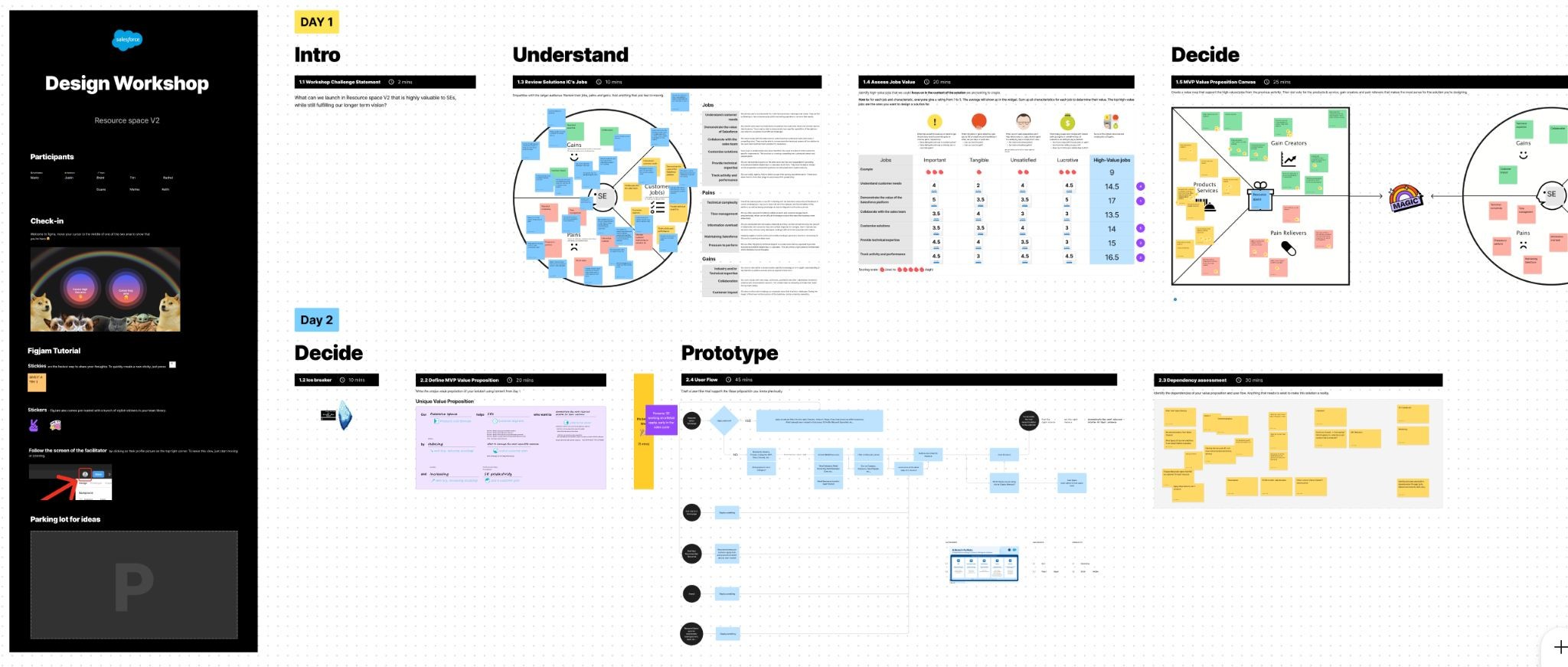
Day 1 mapped the problem and voted on priorities. Day 2 sketched flows. We left with our problem statement.

The "Get started" blocks buried in old topic pages (outlined) became a Quick Start row at the top of each new industry page.
Two sides of one library: people who find, and people who publish.
A fellow product designer and I built seven personas from questionnaires, interviews, and workshops. The big shift: the people maintaining content had as much at stake as the sellers.
 Persona example
Core Solution Engineer
The day-to-day seller in the room. Builds demos and finds assets for a live deal, usually across several industries.
Designed for her- "Where do I start?" → Recommended view from her deal
- "Is this up to date?" → official stamps and last-updated banners
- Searching Slack, Highspot, SW, SC → one place for resources
- Confused by resource types → a distinct template per type
Says
- "I don't know where to start"
- "Is this up to date?"
- "How reliable is this information?"
- "Who is the expert in this industry or product?"
Thinks
- Is this official, trusted content?
- This is information overload
- When was this created or updated?
- Should I use Highspot or Solutions Workspace?
Does
- Spends a lot of time searching for content
- Searches Slack, Highspot, SW, and SC
- Looks for content from a trusted peer
- Duplicates content
Feels
- Unsure
- Overwhelmed with resources
- Confused by resource types and spaces
- Like time was wasted

The persona set, February 2024

Needs matrix: which personas share which needs. It told us where one design could serve several roles.
Flows first, then low fidelity, so reviews were about structure.
I mapped how people move through Resources first. Then we wireframed with the product owner and tested with SEs before anything went high fidelity.

1 · Brainstorm. Inspiration from other products, grouped by content type

3 · Wireframing board. Worked in priority order, with review notes left in place
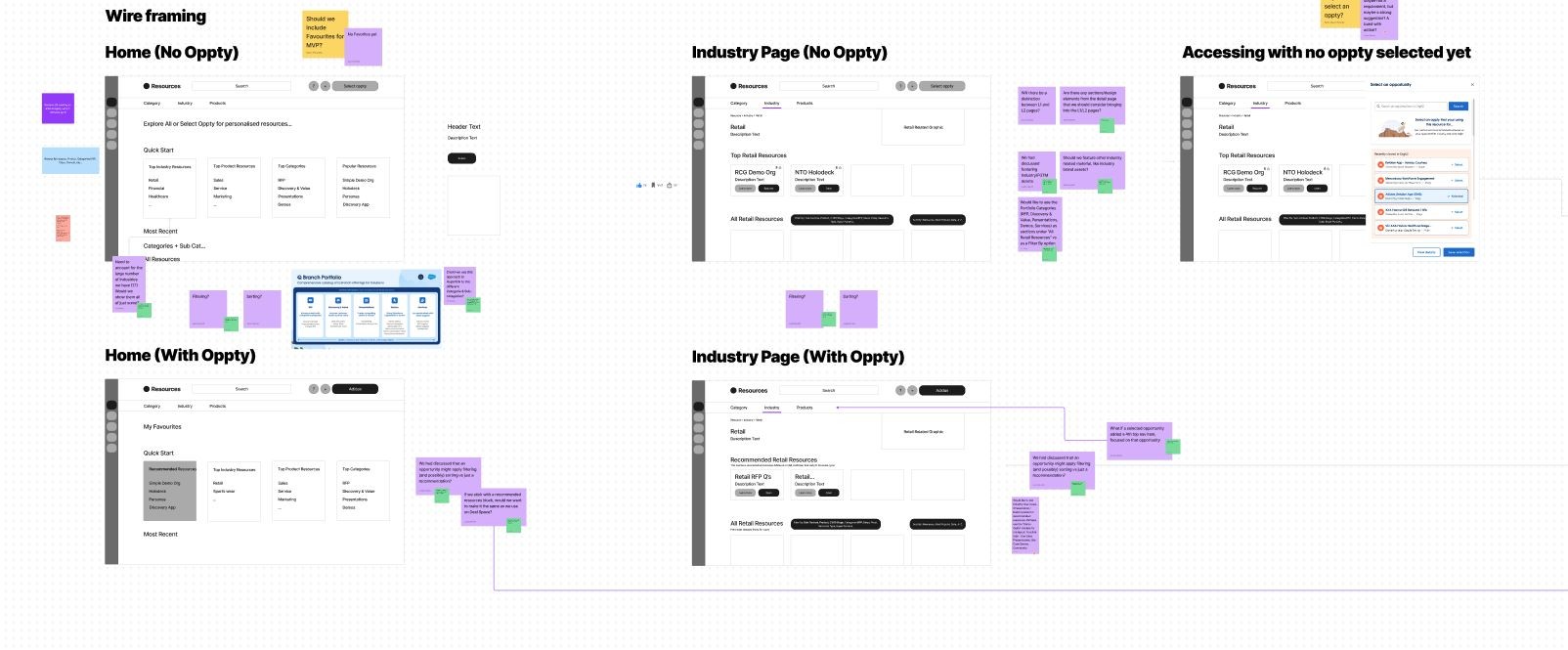
3 · Lo-fi wireframes. Home and industry pages, with and without a deal selected, plus the no-deal prompt. Sticky notes are review feedback.
Map the paths before drawing the pages
Every path into Resources, from home or a category, then narrowing by product, industry, and sales stage, at two entry levels.
- Turns on: pick a deal and Recommended switches on with its filters applied.
- Resets: change a filter and Recommended steps aside; your filters stay.
- Disabled: if Group by is pre-selected, Category turns off so the two can't conflict.
- Why: engineering never had to guess.

The Resources flow: entry points, filters, and the rules for what resets, stays, or gets disabled
Start from the patterns people already knew
Resources didn't exist yet, so the first wireframes reused patterns already in our product, then added personalization so sellers could find what helps them win.
Wireframes in front of SEs, early
We put the template wireframes in front of SEs and watched for:
- How they browse: where they start, how they narrow.
- What's valuable: what they'd use on a real deal.
- What order: what goes up top, what can wait.


One generic layout, same order for every type
Order set by SE testing: what they need first sits at the top, the rest below the fold
Open question: does a deal only recommend, or also filter?
Both. Picking a deal turns on Recommended and pre-applies its filters. Changing a filter resets it.
"Should we include Favourites for MVP?"
Cut from the MVP to protect the launch date
From SE testing of the template wireframes and the review notes on the lo-fi board.
Design within the system, not around it
We had to build inside our product design system and ship in about six months. So I started from patterns we already had. Where the system had a gap, I designed a reusable component, like an accordion or a stepper, and contributed it back with build-ready specs instead of making a one-off.
Rebuilt from my Figma accordion spec.
Body content sits under a 1pt divider and stays in reading order.

Designed, reviewed, and cut before launch
What lived outside the system got cut
Engineering told us these wouldn't fit the timeline. We cut them with the product owner, and because their slots were already designed, they could come back later:
- Quick Start carousel at the top of industry pages
- Icons and custom imagery for each page
- Group-by options and custom filters
- The full filtering side panel and stage tabs
Show a little, reveal on demand, and never lose their place.
A working recreation with sample data. Change a filter and watch Recommended respond, then turn on the design notes.
What from the deal is worth showing?
My fellow product designer designed the global selector that pulls a seller's deal from the CRM and ranked the fields SEs actually use. It sits above every app, so Resources had to work within it. MVP recommendations were generic; V2 became personalized.
The whole flow, clickable, end to end.
The full flow, end to end: pick a deal, filter, open each template, spin up a demo, and land on the deal page.

Bring options and a recommendation, not open questions.
How my fellow product designer and I worked with engineering and the product owner, from first wireframes to GA.
5 developers, 2 leads
- Scoped the MVP together. Every section labeled Required, Optional, or Not for 1st launch, weighed against time and capacity.
- Checked feasibility during design, not after it.
- Annotated interactions and states, so nothing was left to guesswork.
- Ran the bug bash with them from a shared design review doc.
Turning vision into decisions
- Brought options, not open questions, each with a recommendation and a decision date.
- Agreed on the MVP, so the long-term vision stayed intact.
- Told the field together. We previewed timeline and value to SEs, AEs, and content owners, so GA wasn't a surprise.
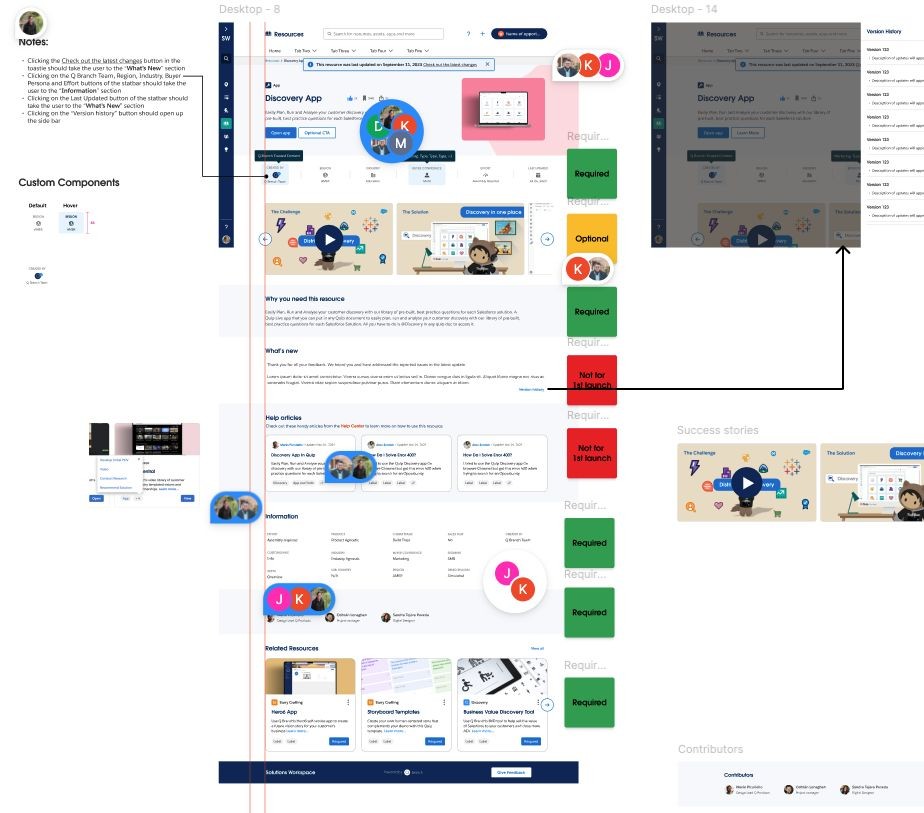
Defining the MVP with our developers: every section labeled, with interaction notes and component states

Our design review and bug bash doc, shared with engineering

Every section got a label
We walked the final design with engineering and tagged each section. "What's new" and help articles waited, and nothing was lost because the slots were already designed.
Big vision, few decisions
A visionary Product Owner who kept discussions conceptual while we needed to ship.
Two concrete options
We stopped asking open questions and showed up with prototypes.
A clear recommendation and a deadline
"This needs a decision by tomorrow's call."
A working rhythm, not a fight
His vision had something concrete to react to, and we kept shipping.
Templates the authors could keep running
My instinct was a rich custom template per type, but the authors weren't designers. So I built a spec'd Figma production template with reusable components they could use.
Ship the core types first
Templates launched for three content types, then the system extended to Services without a redesign.
From hard to trust to the #2 destination in the product.
Unique users on Solutions Workspace
Most-clicked destination after the Resources redesign, right behind Demos
Structured metadata fields, applied across every resource
Reactions to the launch announcement in the product channel

The GA announcement. Click to enlarge.
"This is big news for content. Our entire portfolio of resources is now all in one place."GA announcement, product management channel
- Improved search
- New filtering options
- Opportunity alignment
- Easier UI
- Trusted resources
- Consistency
Next up: redirecting Solutions Central traffic, so there was one place to find and manage resources.
Click rank shows adoption, not success
Becoming the #2 destination told us people came. To know the design worked, I'd track:
- Time to find: how long from opening Resources to opening the right asset
- Search and filter success: sessions that end in an open, not a dead end
- Trust: share of views landing on official, recently updated content
- Owner health: how many resources stay current without reminders
"A drastic improvement."Usability test participant, unmoderated testing on the Demo Signups flow in the same product
"It's intuitive, so without spending too much time I can see that I can create the demo."Usability test participant, Demo Signups
I treated handoff as the finish line. It wasn't.
The authors struggled with the template files I handed over, so I went back, ran enablement sessions, and trained them in Figma. Today they run it themselves.
What worked, what I'd change, and what I learned.
From my own reflection after launch, alongside the team retro.
What worked
- Fruitful collaborations
- Support from leadership
- Persona work
- Successful launch
- Design system
What could have changed
- Earlier buy-in from Demos
- Miscommunication
- Time zone differences
- Constantly changing initiatives
- So many leaders involved, but hard to connect
- No chance for future launches
What I learned
- Be prepared for lots of Slack huddles
- Be flexible
- Be firm
- Have your team's back
- Strategy and design need a seat at the table

Team retro: what went well, what didn't, and what to do differently
The work of a product designer is never over
Could we have a Google Local Guides–style ranking? Contributors earn badges for posts and engagement, and lose points when their content hasn't been reviewed.